Showing posts with label Revizto. Show all posts

Thursday, November 9, 2017

Watch My NVIDIA Webinar on VR in the AEC Space

I am happy to report that my webinar, hosted by NVIDIA, on VR in the Architecture, Engineering and Construction (AEC) industry went well yesterday! We had over 700 people registered and a ton of questions.

Based on one of the poll questions, over 60% of those in attendance were not using VR in their practice currently. Which was pretty cool, as I was able to share a lot of information with them.

A VR project example using Enscape and NVIDIA Quadro P6000

As I mention at the beginning of the presentation...

Tuesday, November 7, 2017

Reflecting on BILT-EUR 2017 in Aarhus Denmark

I would like to share a few thoughts and experiences on the recent BILT-EUR 2017 conference in Aarhus Denmark.

Speaking Opportunities

I have fortunate to present at various conferences all over the United States, and even the world, on architecture and building information modeling. For instance, the Minnesota AIA Convention in 2016 on practical applications of...

Friday, September 29, 2017

New Revizto Promotional Video

Revitzo just published a nice new promotional video. Several people were interviewed for this piece, including myself. The footage was shot during the BILT-NA event in Toronto this past July (2017).

Additionally...

Wednesday, September 13, 2017

My Revizto Webinar Recording

Quick post today... to provide a review and link to the recorded Revizto Webinar I did yesterday.

Webinar: Using Revizto for collaboration and client engagement at LHB (45 minutes)

Here are a few highlights, mostly in images, on what I covered...

Thursday, September 7, 2017

Webinar: Using Revizto for Collaboration and Client Engagement

I will be doing a presentation for Revizto next week! Here are the details...

REVIZTO GLOBAL WEBINAR

with our special guest 
Dan Stine, LHB

Using Revizto for collaboration
and client engagement at LHB

______________________________
Tuesday, September 12, 12PM CDT 
We are excited to invite you to join us for our global webinar hosted by Dan Sine - Author, Educator and BIM Administrator at LHB.

Dan will walk us through a proven workflow for collaboration and client engagement using Revizto. This presentation will simulate a client meeting, highlighting ways Revitzo can be used to explore the model and capture client comments and requested changes. Attendees will get a chance to see how several Revizto features can be used  collectively to demonstrate the design intent and react to client questions with minimal effort. 


We will leave the last 10 minutes for any questions you would like to ask Dan after his presentation.
We are looking forward to seeing you on September 12!


Thursday, August 17, 2017

MEP Review of Architectural Model

You are just getting started on a project and need to familiarize yourself with the building. The architect just sent their current version of the Revit model. Consider the items in the following list to help get things off to a good start.

1. In the Options dialog, on Rendering section, set Render Appearance path to a custom “Revit Textures” folder you create on the network. Copy any texture files provided by the architect (e.g. jpg or png files). This will help with any visualization or VR you might want to do from an MEP perspective.
Additionally...

Friday, August 4, 2017

BILT-NA 2017 Toronto Canada; Day One

The first day of BILT-NA 2017 in Toronto Canada is now behind us. For those not able to make it, or are not sure what this BIM-focused conference is all about, here are a few highlights...

Like most conferences, everyone gathers for a formal plenary introduction to the conference first thing. This was lead by the new fearless leader of the North American (NA) committee Robert Bell. Bob did a great job kicking things off.

The major sponsors were given a few minutes to get on stage and say a few words. ANTHONY HAUCK from Autodesk talked about some cool stuff his group is working on with generative design and AI. Next up ANDREW RINK from NVIDIA and SEAN YOUNG from HP announced Reinvent Life on Mars and the new HP Z VR backpack (more on this later).
Andrew Rink and Sean Young

ARMAN GUKASYAN
from Revizto took the stage to highlight their product and then announce the keynote speaker DAVID RENDALL.


IAN MCGAW also spoke about his companies use of Revizto.

The registration desk was busy checking in over 500 attendees.

There are a number of larger-than-life schedules in the hallways in case you lose your program or don't have access to the conference app.

CLAY HICKLING and I had one of the first session slots on What's New in Revit 2018 (and 2018.1). I think the class went pretty well, with lots of interaction from the audience. At the end of the session I gave away 5 books.

Nice decals on the elevator doors, telling everyone how to get the conference app, on the conference floor!

The exhibit hall is spacious and packed with lots of great product and service providers.

At the HP & NVIDIA booth(s) I found TOM WHITEHEAD test driving the new HP VR backpack which is now available for purchase at about $3500US (nice!). This has two hot swappable batteries and a NVIDIA Quadro P5000 graphics card (click here is see my review of the P5000).

Of course I took it for a drive... next two images are of me:)


MARCELLO SGAMBELLURI and DON BOKMILLER presented an interesting session on using gaming engines in the MEP and structural disciplines. A fun session to be sure!

BRIAN MACKEY and MATT JEZYK (from Autodesk) did a session on using journal files to create scripts which can be used to make batch changes to content and project files. Excluding my session, because I am biased, this was the best session of the day. Brian always does great presentations.

The day wrapped up with dinner provided in the exhibit hall sponsored by Pluralsight... my family with with me in Toronto so we took off and went to dinner on our own.

In closing this post, I will say that a smaller conference like this with the number high caliber, industry influencers, makes this a great opportunity to network and take deep dives on topics that you are challenged with or just interest in.


Tuesday, May 30, 2017

Free ArchVision Rendering Webinar Presented by Dan Stine

If you have any interest in general rendering techniques in Revit and beyond... consider sighting up for this free 90 minute webinar! ArchVision is hosting and I will be presenting. This will be a live presentation with 15-20 minutes for questions at the end.

  • "Revit Rendering Workflows with Dan Stine" presented by ArchVision
    Tue, Jun 6, 2017 12:00 PM - 1:30 PM CDT
    Register Now!

I will be covering materials, lighting and using RPC content to make your rendering come to life. Workflow into Enscape and Revizto will also be covered.

  • Bonus: I will also be unveiling two new "chunks" of content from ArchVision... you have to tune in to find out what they are.

The example Revit rendering below is from my Interior Design Using Autodesk Revit 2018 textbook. This example contains several ArchVision RPC families, including a custom version of me (gray vest, middle left)!


This next Revit rendering is one I did for our Minneapolis office... read this related ArchVision blog post: LHB Minneapolis Office Renderings Submitted for LEED® CI Platinum. FYI: This is an old post, LHB was awarded the LEED certification!


Although this is geared towards beginners, I will be covering a few cool tips and tricks that even experienced users might not know (or remember:)).

The best part is ArchVision is offering this presentation for free!

Monday, May 22, 2017

SketchUp to VR with Revizto

For those within, and around, the Revit ecosystem, you may not know that Revizto supports SketchUp as well. As you can see in the screen grab below, from the Revizto website, they support a number of applications and file formats.


When Revizto is installed, and SketchUp is present on your system, it will add the SketchUp plug-in. Once installed, simply open a Sketchup model and click the export to Revizto command. From there you have access to the model in Revizto and.... the reason for this post... quick access the a virtual reality experience within a SketchUp model!

The two images below are from a large multi-building, landscape architecture (LA) and civil project we collaborated on a few years ago (SU model created by our LA group). A larger overall image of this project can be seen on LHB's website, if interested: The Promenade of Wayzata.


Notice the hand colored, with markers, ground surface image came into Revit. Not that it is hard to navigate a SketchUp model, but you can use all of the familiar navigation techniques in Revizto to get around the model.

  • For navigation, I love the 3D Connexion mouse. Last year I was able to get 3D Connexion to provide their 3D mice for my lab at RTC in Australia!


With the SketchUp model now exported to Revizto, we can open the model in VR... using the Oculus Rift or the HTC Vive. The image below is NDSU grad, Areosmith fan, and LHB'er Carolyn Stevens buzzing around a model using the Oculus.


I will close this post with a "homemade" video I created in 1-2 days. I have some practice as I create videos for my AutoCAD and Revit textbooks. Did you know I even have a SketchUp book (but it does not cover VR)?


Anyway, here is a video we never really ended up using due to audio quality... but towards the end it shows the SketchUp model in Revizto. Project Principal Aaron Kelly is also seen at the end of the video giving an unscripted plug for VR at LHB!


That's all...

Thursday, May 18, 2017

ArchVision Entourage (RPC) in Revit and Beyond

This post highlights the varied paths ArchVision's RPC content takes from Revit to a few popular visualization/VR applications; namely Enscape, Fuzor and Revito. I will let the reader decide which option is best. My goal here is to highlight the opportunity to keep things Revit-centric.

As I understand it, all the RPC content included with Revit is provided by ArchVision as a sample. They have an extensive subscription-based library, in addition to the free content, which I will talk more about in the future. Today I will focus on the free sample content.

Revit

All of the RPC content works well in Revit. It can be seen when a view is set to Realistic, when rendering within Revit or when pushed out to the cloud. This LHB Superior Street project Google Cardboard view shows a nice example of ArchVision RPC content (People, Trees, Vehicles and the orange cones) in an Autodesk cloud-based rendering.

To test the array of RPC content I placed each family/type in a Revit project as shown below. Actually, I first created this file so our Landscape Architects could see what the vegetation would look like in VR, based on the RPC content placed in Revit.
Below is a closeup camera view of the people. Revit provides one male and one female RPC family, each have multiple types.
The image below is a quick peak at the ArchVision Dashboard. which can be used to place both the sample and subscription content (simply drag and drop). Alternately, the sample content can be placed using the Load Family command and then the Component tool within Revit.

  • FYI: In the near future I will be doing a rendering tips and trick webinar for ArchVision, so stay tuned for more on that!


Enscape

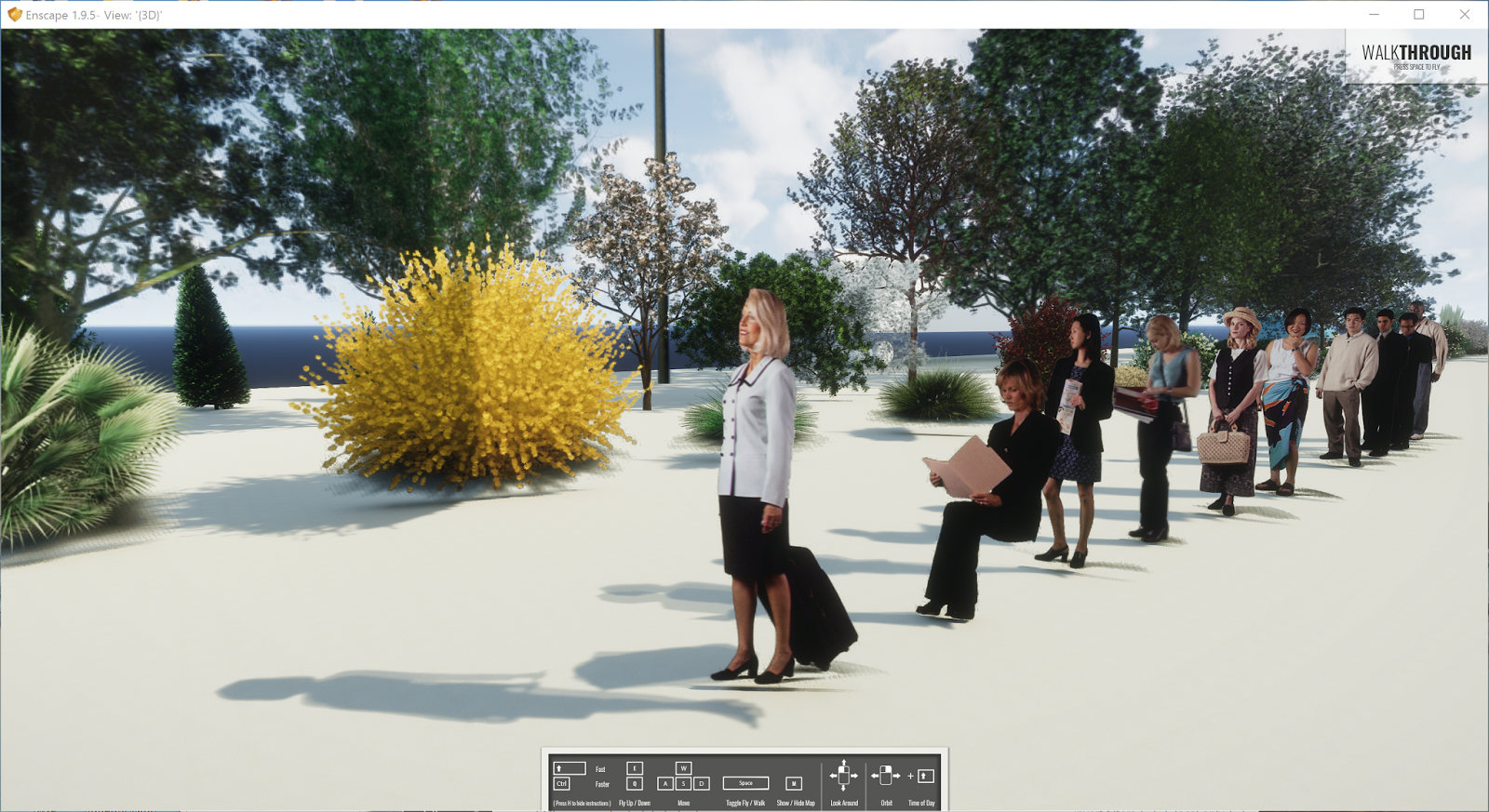
When Enscape is installed, the Revit model can be opened/linked to their real-time rendering environment. But first, in Enscape's Settings we have the ability to use the same ArchVision content used in Revit or replace them with their own stuff. Notice the "Replace Archvision Content" option.

First, we will look at the Enscape replacement entourage. Here is the same overall view of the RPC replacements in Enscape.
A similar close up view...
Another angle...
Now we will uncheck the "Replace" option and see what the ArchVision content looks like in Enscape. Here is the overall view again. I also did this in yesterday's post; Bridging the Gap with Enscape and Revit.
A close up of the people. For some reason they are turned in a different direction.
Another angle...
A quick look at the vegetation content.

 Fuzor

The RPC content gets replaced with custom content when the Revit model is exported to Fuzor. The ArchVision RPC content is not directly supported. But I like that we can still place content in Revit.
The Fuzor content has a similar look to the original RPC content in Revit. This content is also animated. The people will occasional shift their body position and check their watch.
Another angle...

Revizto

When a Revit model is exported to Revizto, the RPC content is directly supported. Here is a previous post about Revizto supporting ArchVision content: Revizto 4.2 Supports ArchVision RPC Content!

Here is the close up view of the entourage in Revizto.

Did you notice, in the image above, our vantage point appears a little low? Well, earlier this week I was at a staff presentation for a new elementary school we designed. We walked through the entire school in Revizto to explain the project and answer questions. After that, there was a similar presentation for the community, parents and students. During this presentation, a young student asked "can you make the person my height?". We aim to please, as evident by the previous and next images:)

Here is the same view adjusted back to adult height.
And another angle...

Here is a link to the sample Revit project with all the RPC content placed: click here to download.

I wanted to provide a video for each of these examples, but my computer with Camtasia is out of commission right now. Please comment below if you are aware of other visualization/VR apps that support the RPC content placed in Revit.

Wednesday, May 17, 2017

Bridging the Gap with Enscape and Revit

Autodesk Revit is made to design buildings, but that doesn't mean we can't push the limits here and there. In an effort to expand the use of Virtual Reality (VR) across the various disciplines at LHB, I have helped nurture a few unconventional projects in Revit to that end. Why Revit? It is the primary 3D modelling tool we use and it has good friends in the VR business; Enscape, Revizto and Fuzor to name a few.

In this post I want to share some nice still images, of a historic bridge restoration project, from Enscape. In my last Enscape post I talked about an urban streetscape project executed in Revit for VR.

Everything in this model was created in Revit and viewed in Enscape (for this post). The surface was derived from an AutoCAD Civil 3D file created by one of our in-house survey crews. Plus, more vehicles downloaded from the web, which are imported DWGs.

  • Be sure to clink on the images to see more detail in the enlargements (they are all 4k images; approx. 15mb PNGs).


Wait, something's wrong with the color of this pickup truck...

The material is currently set to Wall Paint. Even though it is set to "Glossy" the concept is fundamentally different car paint.

So, let's change that material to use a Metallic Paint, where there is a built-in parameter called Top Coat with a Car Paint option!

The result is a "little" better!

The reflection in the truck is super cool...
 
This actually is a really large lake... not Lake Superior, but one of the 10,000 lakes in Minnesota.

The shoreline and road/tress in the distance look so realistic!

This one is for Autodesk University start and Revit MEP guru David Butts!

While in motion the water appears to be moving in Enscape. Still images produce a beautiful water appearance with reflections.

In reality, the stones are not this smooth, but they have an applied texture created from a photo of the existing stone. The special Enscape Grass is amazing in this context!

The survey showed existing picnic benches, so why not add them.

Nice view of the bridge from this picnic bench.

All the previous images show the Enscape replacement for the ArchVision RPC content (i.e. the vegetation). Enscape supports the RPC content, and the remaining images show them. Love the reflection on the postal van.


Ignore the fact that there are vehicles flying down the road with nobody in them! Well, in the future I suppose this could be a thing; someone texted their car to pick them up!

Fun stuff!