Showing posts with label Fuzor. Show all posts

Thursday, July 29, 2021

Lake Flato HQ Remodel Experienced with Microsoft HoloLens 2

I recently shared the magic of the Microsoft HoloLens 2 with the office... and what better project to use for this demo than our own Lake Flato HQ remodel here in San Antonio, Texas. This is the topic of today's post...

Architect Evan Morris using Microsoft HoloLens 2 at Lake Flato Architects


keep reading the learn more...

Friday, March 15, 2019

Microsoft HoloLens on LHB Urban Street and Utilities Reconstruction Project

I wanted to share an example of how the Microsoft HoloLens can be used on Public Works projects. With the impending release of the next generation HoloLens 2, the use of holograms in design and constriction is only going to become more prevalent... so check out this post to get up to speed!

This post features an LHB urban street and utilities reconstruction project.


Keep reading to learn more...

Thursday, December 27, 2018

Fuzor 2019 Update Includes a New Avatar - It's Me!

In the most recent update to Kalloc Studio's Fuzor app, they added a new avatar,  it's me!


Read on to learn more...

Wednesday, May 30, 2018

My Fuzor Avatar, For Real!

I have written about Cad Technology Center's (CTC) large object scanner before, and their store called ME3D in the Mall of America. CTC has also worked with, and promoted Fuzor, a product we use at LHB. Here are a few of the webinars CTC has hosted: Click here for YouTube list.

Out of these two connections and the fact that I would be speaking on Virtual Reality at NVIDIA's GTC 2018 I was able to get a special scan of myself at CTC which was sent to Fuzor and turned in to a custom Avatar, just for fun!


If you notice in the image above and video below, I am even wearing my Revit Express Tools shirt... which is yet another connection, as CTC sells the Electrical Productivity Pack I helped create at LHB!

Here is a video I created of my avatar running around our...

Wednesday, February 21, 2018

Another Dedicated VR Space - Seriously!

In our Duluth office, where I work, we are in the process of creating a large, open collaboration area with our Integrative Design Team (IDT) floor.

Overlapping this space we added a second dedicated VR space as shown in the image below. This offers a spacious "play area" just steps away from where the work is being done.

The two Vive lighthouses are 22 feet apart (6.7M). This provides ample space to actually walk around a virtual workroom, reception area, or exam room, for example.

This space also utilizes the TPCast wireless adaptor to make the Enscape and Fuzor VR experience truly remarkable!


This space is still waiting on some furniture, so things are...

Friday, January 12, 2018

First Look: Fuzor Support for the HoloLens

Kalloc Studios recently implemented support for the Microsoft HoloLens in their Fuzor VDC product. I had the opportunity to try it out and am bringing you this post with the rundown. With voice activated commands, voice to text annotations and element filtering... prepared to be impressed.

First, you export the model from Revit to Fuzor VDC. Before exporting from Fuzor to the HoloLens you have the option of placing a QR Code marker in the model and then printing  the QR Code on paper. You position the printed QR code in the same relative location to speed up the positioning of the hologram in the physical space.

The image below shows the QR Code marker placed in the Fuzor model.

Wednesday, January 10, 2018

Another Dedicated VR Space at LHB

As part of a recent expansion in our Minneapolis office, we added a dedicated VR space! We had a nice large area previously, but it was shared and required a couple tables and chairs be moved... that old space can be seen in this Dell video: LHB visualizes architectural designs through virtual reality powered by Dell Precision.

This space is fitted out with an HTC Vive using the wireless TPCAST adaptor, powered by a new...

Tuesday, December 5, 2017

Fuzor 2018 - New 3D Markup Tool

Thought I would share a short video showing the new 3D markup tool in Fuzor 2018. It reminds me of the Google Title Brush app for VR.

This tool allows the person in VR to sketch 3D lines of various colors in and around your model.

Stepping back and looking at the marked up area, simply press...

Friday, November 17, 2017

Fuzor VR Example - New Elementary School

In my recent NVIDIA webinar I showed a few examples of using Fuzor for Virtual Reality (VR). To watch that recorded webinar, check out this previous post: Watch My NVIDIA Webinar on VR in the AEC Space.

I started running out of time and was not able to show the full length of each video. So I figured I would share them one at a time here.

It is interesting to note the...

Thursday, November 9, 2017

Watch My NVIDIA Webinar on VR in the AEC Space

I am happy to report that my webinar, hosted by NVIDIA, on VR in the Architecture, Engineering and Construction (AEC) industry went well yesterday! We had over 700 people registered and a ton of questions.

Based on one of the poll questions, over 60% of those in attendance were not using VR in their practice currently. Which was pretty cool, as I was able to share a lot of information with them.

A VR project example using Enscape and NVIDIA Quadro P6000

As I mention at the beginning of the presentation...

Thursday, May 18, 2017

ArchVision Entourage (RPC) in Revit and Beyond

This post highlights the varied paths ArchVision's RPC content takes from Revit to a few popular visualization/VR applications; namely Enscape, Fuzor and Revito. I will let the reader decide which option is best. My goal here is to highlight the opportunity to keep things Revit-centric.

As I understand it, all the RPC content included with Revit is provided by ArchVision as a sample. They have an extensive subscription-based library, in addition to the free content, which I will talk more about in the future. Today I will focus on the free sample content.

Revit

All of the RPC content works well in Revit. It can be seen when a view is set to Realistic, when rendering within Revit or when pushed out to the cloud. This LHB Superior Street project Google Cardboard view shows a nice example of ArchVision RPC content (People, Trees, Vehicles and the orange cones) in an Autodesk cloud-based rendering.

To test the array of RPC content I placed each family/type in a Revit project as shown below. Actually, I first created this file so our Landscape Architects could see what the vegetation would look like in VR, based on the RPC content placed in Revit.
Below is a closeup camera view of the people. Revit provides one male and one female RPC family, each have multiple types.
The image below is a quick peak at the ArchVision Dashboard. which can be used to place both the sample and subscription content (simply drag and drop). Alternately, the sample content can be placed using the Load Family command and then the Component tool within Revit.

  • FYI: In the near future I will be doing a rendering tips and trick webinar for ArchVision, so stay tuned for more on that!


Enscape

When Enscape is installed, the Revit model can be opened/linked to their real-time rendering environment. But first, in Enscape's Settings we have the ability to use the same ArchVision content used in Revit or replace them with their own stuff. Notice the "Replace Archvision Content" option.

First, we will look at the Enscape replacement entourage. Here is the same overall view of the RPC replacements in Enscape.
A similar close up view...
Another angle...
Now we will uncheck the "Replace" option and see what the ArchVision content looks like in Enscape. Here is the overall view again. I also did this in yesterday's post; Bridging the Gap with Enscape and Revit.
A close up of the people. For some reason they are turned in a different direction.
Another angle...
A quick look at the vegetation content.

 Fuzor

The RPC content gets replaced with custom content when the Revit model is exported to Fuzor. The ArchVision RPC content is not directly supported. But I like that we can still place content in Revit.
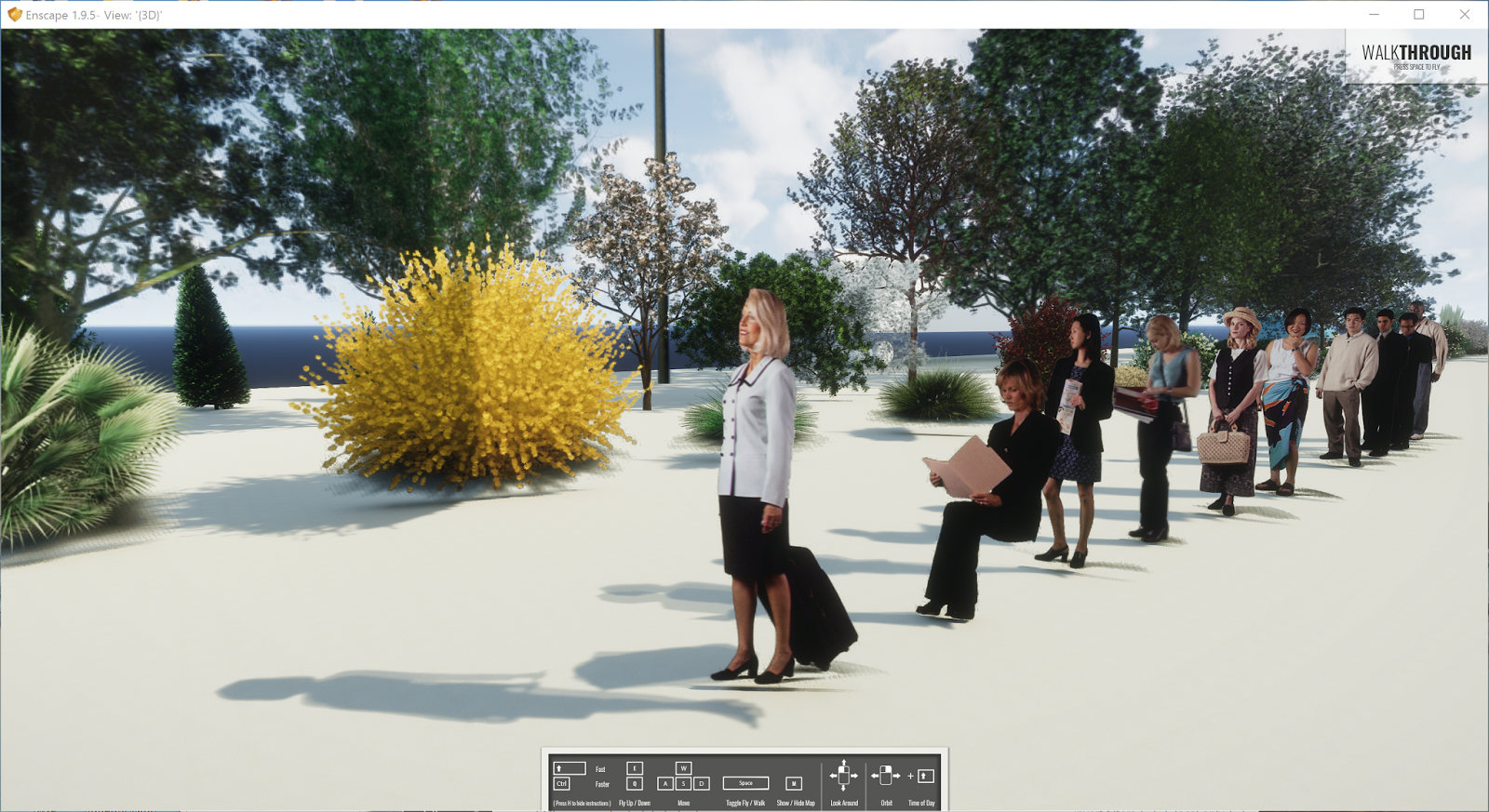
The Fuzor content has a similar look to the original RPC content in Revit. This content is also animated. The people will occasional shift their body position and check their watch.
Another angle...

Revizto

When a Revit model is exported to Revizto, the RPC content is directly supported. Here is a previous post about Revizto supporting ArchVision content: Revizto 4.2 Supports ArchVision RPC Content!

Here is the close up view of the entourage in Revizto.

Did you notice, in the image above, our vantage point appears a little low? Well, earlier this week I was at a staff presentation for a new elementary school we designed. We walked through the entire school in Revizto to explain the project and answer questions. After that, there was a similar presentation for the community, parents and students. During this presentation, a young student asked "can you make the person my height?". We aim to please, as evident by the previous and next images:)

Here is the same view adjusted back to adult height.
And another angle...

Here is a link to the sample Revit project with all the RPC content placed: click here to download.

I wanted to provide a video for each of these examples, but my computer with Camtasia is out of commission right now. Please comment below if you are aware of other visualization/VR apps that support the RPC content placed in Revit.

Sunday, April 30, 2017

NVIDIA Quadro P5000 for AEC VR; Best Architectural Experience Yet

LHB has been using virtual reality (VR) a lot over the last year and I am heading up that effort. We are using it for everything from internal design review to public meetings, groundbreakings and grand openings.

VR at Grand Opening for Duluth Transportation Center

VR Across Disciplines

While architecture is the main use case, we have used VR for multiple civil projects (urban street & utilities project and a historic bridge restoration project) and fairly complex pipeline projects (pump stations).

For more on our urban street project and our use of the Quadro P5000, check out these two NVIDIA links:


VR Model of Urban Street and Utilities Replacement Project

Graphics Card is the Bottleneck for VR Experience

We use various VR hardware and software; Oculus Rift, HTC Vive and Enscape, Fuzor, Revizto, Regardless of the combination of these, the bottle neck in performance is the graphics card (GPU). I have used several NVIDIA cards for VR, for example:

  • GeForce GTX 980
  • GeForce GTX 1070 (in my Alienware laptop)
  • GeForce GTX 1070 x 2 SLI (in our VR Lounge)
  • GeForce GTX 1080
  • Quadro P5000

The Quadro P5000 has produced the absolute best experience in VR for our complex projects. When we got this card I expected the improvement, if any, to be moderate. I was amazed at the significant improvement, even over the SLI'ed setup in out VR Lounge (more on this later).

When I first realized the difference, I had these two systems setup right next to each other:

  • HTC Vive powered by a Dell Percision 5810 with the Quadro P5000
  • HTC Vive powered by an Alienware Area 51 with the GTX 1070 x 2 (SLI)
I tested the same large complex model; a school with complete structure, MEP and a detailed food service model. The SLI'ed setup was choppy and uncomfortable compared to the P5000, which was very smooth and responsive.

Clearly the magic of the P5000 comes from the GPU's Pascal architecture, 2560 CUDA cores and 16 GB of GDDR5X memory! Yes, you read that correctly, 16 GB of on-board memory.
NVIDIA Quadro P5000 Specs
Another great thing about a VR Ready Quadro-based graphics card is that many large computer manufactures do not offer consumer grade hardware, such as the GeForce cards, with their lease programs. Given many medium to large AEC firms buy via lease programs, getting a VR capable card meant ordering a computer without a graphics card and then buying the graphic card separately. This complicates things, including service/warranty programs.

Even though the Quadro P5000 card has a high MSRP compared to the GeForce GTX cards it is often the case that hardware and software are much less when purchased as a package from Dell, HP, etc.

Fuzor Leverages NVIDIA Features to Maximize Performance

We have been using Fuzor a lot with the HTC Vive for its nice array of in-VR user features. For the NVIDIA Customer Story listed above, the folks at Kalloc Tech gave me this list, which highlights the NVIDIA features directly supported by Fuzor:
  • Features which only work on NVIDIA cards
    • VR SLI support using NVIDIA VRWorks, where each video card renders one eye.
    • Multi-projection support from NVIDIA VRWorks, where a single NVIDIA Pascal series card can render two eyes simultaneously.
    • Fast and accurate light analysis reports using NVIDIA OptiX raytracing.
    • Multi-threaded rendering using DirectX11 Driver Command Lists for faster performance.

  • Features which work on any card, but were created by NVIDIA
    • PhysX for avatar walkthrough, vehicle driving, refit collision, clash detection, and filtered scene queries for many different features.
    • NVIDIA ShadowWorks for high quality ambient occlusion.

Thus, for the dual GTX 1070 (SLI) cards in our VR Lounge, there is one card for each eye in the Head Mounted Display (HMD). But, even this setup does not keep up with the Quadro P5000!

A Look at the Hardware

I want to share my experience setting up the Quadro P5000, which replaced a GeForce GTX 1080 in a Dell Precision 5810 (this is the computer we take on the road). With this information in hand, anyone can jump right in and start leveraging the full potential of this card for VR.

As seen in the image below, the form factor of the P5000 and 1080 is pretty much the same.

Quadro P5000 and GeForce GTX 1080 Have Similar Form Factors

The biggest surprise I had when opening the P5000 is when I noticed there was no HDMI port on a VR Ready graphics card; compare the two images below. More on this in a moment...

GeForce GTX 1080; 1 HDMI, 3 Display Port, 1 DVI

Quadro P5000; 4 Dusplay Port, 1 DVI

The next image shows the GeForce GTX 1080, which is about to be removed.

GeForce GTX 1080 in Dell Precision 5810

Here is the Quadro P5000 seated and powered.

Quadro P5000  in Dell Precision 5810
Both cards require an adapter to properly power them. This cable came with the GTX cards, and was already in some of our Dell computers but was not in use as the Quadro M2200 GPU did not need this much power.

Required Power Adapter for Both

DisplayPort to HDMI 1.4 or DVI to HDMI 1.4
Back to the no HDMI port issue... the NVIDIA website lists two tested Video Adapters;

  • Accell B086B-004B-2
  • Bizlink KS10046-A07

This is the one I ordered from Amazon: http://amzn.to/2pugQcL (see the next two images). This is required for full transmission of audio and video.

I started with multiple adapters I had on hand; DP > DVI > HDMI. This worked, but there was no sound.

DP to HDMI - Required Video Adapter for P5000 (not included)

DP to HDMI - Required Video Adapter for P5000 (not included)

LHB's VR Lounge

In our Duluth office, we remodeled an underutilized space to create a VR Lounge. The large "lounge" space adjacent to the "play area" allows others to see what the VR user sees on the large 4k screen on the wall. The "play area" is in an alcove, which is perfect as it naturally keeps people out of the way of the line-of-sight sensors.

LHB VR Lounge - Large 4k screen on wall

LHB VR Lounge - Lake Superior Visible from Here!

LHB VR Lounge

LHB VR Lounge with Built-in HTC Vive Sensors; Dual GTX 1070's

VR in the Media

We have received a lot of attention from the media given our extensive use of VR and recent presentation on VR at the Minnesota AIA Convention.

The image below is reporter Melissa Colorado from Twin Cities NBC affiliate KARE11 trying the HTC Vive in our Minneapolis office. Check out this link for her story: http://kare11.tv/2pL2Azc


The ABC affiliate in Duluth, MN, WDIO, has done two stories on our use of VR recently:


Minneapolis Start Tribune article: Virtual reality brings architect's blueprints to life

Finally, check out this ARCHITECT Magazine article, Michael Kilkelly, in which I was interview for: http://bit.ly/2pvdhDa

Conclusion

At the end of the day, if a large complex project is not comfortable for staff or your client, they are not going to spend much time using it. Given all the other challenges of keeping drivers and software up to date, having this high performance, engineering-grade, graphics card is simply wonderful. I have felt a lot more comfortable getting in front of clients, the media and even the Minnesota Lt. Governor Tina Smith recently!

For some additional reading on this topic, check out this AEC Magazine article which gets into more technical details on the Quadro P5000's big brother, the P6000 (with 24 GB of memory):
http://aecmag.com/technology-mainmenu-35/1268-review-scan-3xs-ultimate-3d-with-nvidia-quadro-p6000

Fun stuff.